FDF Intranet AI Assistant
Designing conversational access to approved organizational knowledge.
I designed an internal AI assistant to help Family Development Foundation (FDF) employees discover relevant documents, understand AI-generated answers, and inspect their underlying sources. A new implementation—not a visual redesign of the existing E-Chat service.
- Role
- UI/UX Designer
- Timeline
- 2 Months
- Organization
- Family Development Foundation (FDF)
- Platform
- Web-based AI Chatbot
- Languages
- English & Arabic (RTL)
- Team
- Design & Engineering Squad
Two different jobs. Two different conversations.
E-Chat provides historical context for service interaction at FDF. The new intranet assistant addresses a different need: discovering and understanding approved organizational documents.
Existing E-Chat / Service information
The source shows numbered service choices, direct question entry and routing to a live representative. It is not a menu-only experience, and it is not an earlier version of the new AI Assistant.
New AI Assistant / Document discovery
The new interface centers on natural-language questions, answers, Key Points and cited documents. Its design makes evidence visible alongside the answer, with source-level Preview and Download actions.
Historical context · 2023 E-Chat
Actual visible E-Chat viewport extracted from board A. Service choices and direct entry are preserved.
New implementation · AI Assistant
Actual final answer state. This is a distinct product approach, not a before/after version migration.
Finding a document is only part of the task.
The design materials describe requirements, not proven research findings. An employee must be able to ask, understand, verify, and take the next available action.
Natural-language discovery
Allow a topic-based question without requiring an exact filename or folder. Suggested queries provide examples of possible requests.
Readable answers
Separate a direct answer from Key Points and expanded detail so a long response remains scannable.
Evidence inspection
Present sources near the response and make document-level metadata, Preview, and Download visible.
Refinement & historical records
Date ranges and document filters appear in wireframes and flows. Final source cards include dates; a final chronological sorting control is not established.
Recovery states
Provide distinct loading, no-result, connection-error, and restricted-access messages, rather than treating all failures as empty results.
Bilingual access
Preserve English and Arabic interface coverage, including native Arabic reading direction and corresponding interaction states.
From a sketch sheet to a source-grounded interface.
The supplied evidence supports this stage sequence: original hand-drawn sketches → grayscale wireframes → final UI. It does not establish the research or rationale behind every change.
01 One original sketch sheet
Hand-drawn sketches · full landscape sheet
Login, assistant home, results, history, document list, preview, and Help & Support appear together. The original sheet is preserved as drawn.
02 Grayscale wireframes
The source section is named "Hi-Fi Wireframes," but its supplied screens are grayscale. These are original design-stage artifacts, not filters applied to the final UI.
Entry / Login
Entry fields appear at the wireframe stage.
Suggested-query home
Example requests and quick actions organize the starting screen.
Search results
Document cards expose Preview and Download.
Extended home / Filters
Category choices and recent searches are visible in this longer frame.
Search history
Time-grouped entries support returning to previous requests.
Document list
Filtering and document-level actions are explored in the wireframe.
03 Final UI / Answer and evidence
English · Answer & source documents
An answer and expandable sources occupy a single conversational surface.
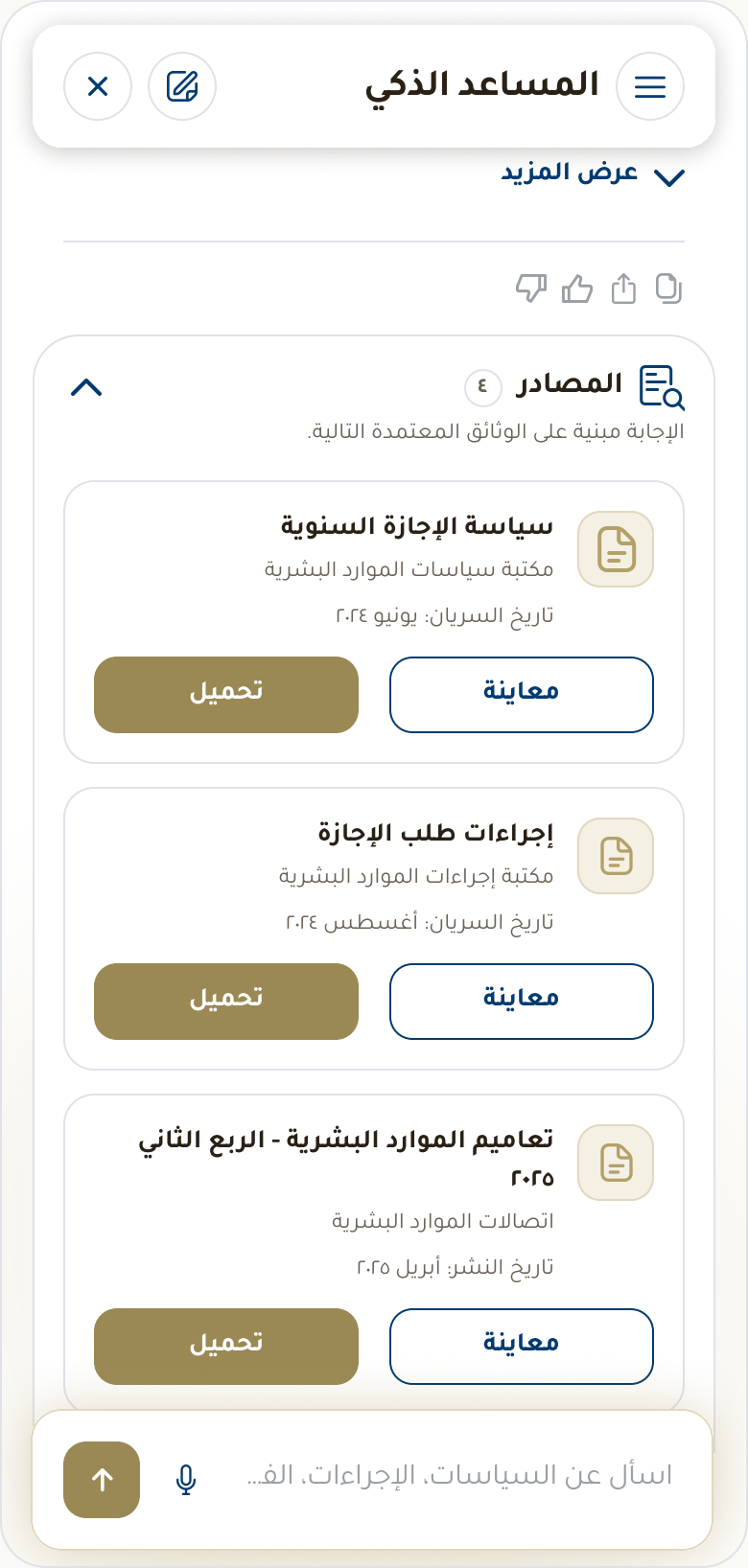
Arabic · Corresponding answer
Arabic text, alignment and source placement are preserved from the original artwork.
A proposed structure, grounded in visible artifacts.
Reconstructed from available design artifacts; requires validation against the original information architecture.
Reconstructed information architecture · Board C
All hierarchy connections are proposed. Solid nodes indicate observed screens or content, not confirmed implemented navigation.
Discovery at the center
The proposed structure links assistant home, suggested queries, conversation, answers, sources, and document actions. History and settings support continuity and preference management.
Evidence boundaries
Entry/login appears in sketches and wireframes, not supplied final UI. Help & Support is sketch-only. English settings is observed; a final Arabic settings counterpart was not found.
The path through search, evidence, and recovery.
Editable web diagrams preserve the source flow sequence and branch logic. They document designed journeys, not verified production behavior.
01 / End-to-end retrieval
Source 2026:34935 · Nine steps in the original sequence. The source labels interpretation as Copilot; actual configuration is unconfirmed.
- User / EntryLogin via SSO
- SystemHome & Suggestions
- UserEnter Query
- SystemUnderstand Query
- SystemReturn Results
- UserApply Date Range
- SystemFiltered Results
- UserPreview Document
- UserDownload
02 / Results decision
Source 2026:34953 · YES and NO branches preserved. No automatic retry loop has been added to the original flow.
- User / EntryLogin
- SystemAssistant Home
- UserEnter Query
- SystemInterpret Intent
- SystemSearch Repository
YES · Results available
- StageResults List
- UserOptional Filters
- StageFiltered Results
- UserPreview
- SuccessDownload
NO · No matching results
- SystemShow Suggestions
- ActionRefine Search
03 / Restricted access — reconstructed
Reconstructed for this case study. The document-owner direction is visible in UI.
- UserSearch Query
- SystemRestricted Access
- Design PrincipleHide Restricted Content
- UserPermitted Next Step
- ObservedContact Document Owner
Privacy principle: Do not expose restricted titles, snippets, or confidential content. Only a clear explanation and permitted next actions should be shown.
An answer is an interaction, not a single output.
This conceptual UX lifecycle describes how the assistant interaction is intended to work. It does not specify backend models or proprietary retrieval algorithms.
Conceptual AI interaction lifecycle
Conceptual model / not a verified technical architecture
- 01 · InputUser Asks
- 02 · IntentQuery Interpretation
- 03 · RetrievalApproved-Source Retrieval
- 04 · GenerationAnswer Generation
- 05 · GroundingSource Grounding & Presentation
- 06 · InteractionUser Follow-up
01 / User input
A person asks in natural language or selects a suggested query. The visible text and voice controls are interface evidence.
02 / Query interpretation
The intended system identifies the user's intent and useful search terms. Ambiguous questions offer suggestions.
03 / Knowledge retrieval
Relevant content is sought from approved intranet knowledge sources (SharePoint) within permission capabilities.
04 / Answer generation
The assistant composes a response from available information, maintaining enterprise tone and scannability.
05 / Grounding & evidence
The supplied answer UI exposes Key Points and cited Sources. Users can inspect evidence rather than relying solely on generated text.
06 / User follow-up
The user can refine the question, expand the answer, inspect source documents, or preview/download files.
How the assistant’s knowledge and responses are managed
A document-oriented interface is not evidence that a model was trained on organizational files. These mechanisms must be distinguished before describing the implementation.
Model training vs fine-tuning
Training changes learned model parameters. The supplied materials do not establish whether FDF used a foundation model, fine-tuning, or retrieval-augmented generation (RAG).
Knowledge preparation & retrieval
Preparing approved documents for lookup is separate from model training. Document selection, indexing, freshness, and removal policies are critical.
Prompt & response configuration
Instructions shape tone, answer structure, uncertainty, and restrictions without changing base weights.
Grounded answer generation
Where supported by implementation, retrieved evidence informs a response with source citations.
Evaluation & QA
Factual accuracy, attribution, bilingual quality, and restricted-content safety require explicit tests.
Governance standards
Auditing compliance, tracking revisions, and enforcing retention rules across organizational documents.
Table Implementation details to confirm
| Open Question | Status |
|---|---|
| Existing foundation model, fine-tuning, or RAG architecture? | Implementation detail to confirm |
| How are approved documents indexed, retrieved, updated, and removed? | Implementation detail to confirm |
| How are permissions enforced during retrieval, preview, and download? | Implementation detail to confirm |
| How are citations associated with specific answer claims? | Implementation detail to confirm |
| Is conversation history retained, and for how long? | Implementation detail to confirm |
| Is human review or user feedback part of the operating workflow? | Implementation detail to confirm |
| How are English and Arabic responses evaluated? | Implementation detail to confirm |
Designing a reply that can be read—and checked.
The actual answer UI separates explanation, summary, and supporting evidence. Annotations describe visible elements, while response-quality statements are evaluation criteria.
Response anatomy · English answer
Answer text, Key Points, expansion, action icons, and Sources card.
01 / Direct answer
The opening response addresses the request before the user reaches supporting detail.
02 / Key Points
A concise list supports scanning, preserving important conditions and exceptions.
03 / More detail
Show more / View less controls distinguish concise and expanded response states.
04 / Sources
The Sources card stays associated with the answer, exposing dates, Preview, and Download.
05 / Response actions
Small action icons (copy, thumbs up/down, share) enable immediate feedback.
06 / Follow-up input
The bottom input remains available to refine the query or ask follow-up questions.
A follow-up is not automatic model training.
Interacting with a response helps the user complete a task. It does not establish that the model learns from each conversation in real time.
Initial query & clarification
The initial question sets the context. Narrowing wording is part of the intended conversational flow.
Refined searches
The wireframes explore document filters; no-result states supply wording suggestions.
Expanded answers & sources
Expansion lets a user inspect detail and evidence with visible Preview and Download actions.
No-result recovery
Suggestion chips provide alternative paths when the query returns no eligible documents.
Service failure & retry
The source error state distinguishes connection failure from zero documents found, providing a Retry action.
Feedback & privacy
Thumbs-up/down controls let users signal response utility, with history and diagnostics preferences.
English and Arabic, preserved as designed.
Nineteen actual final states: ten English and nine Arabic. These are individual source extracts, not translated mockups.
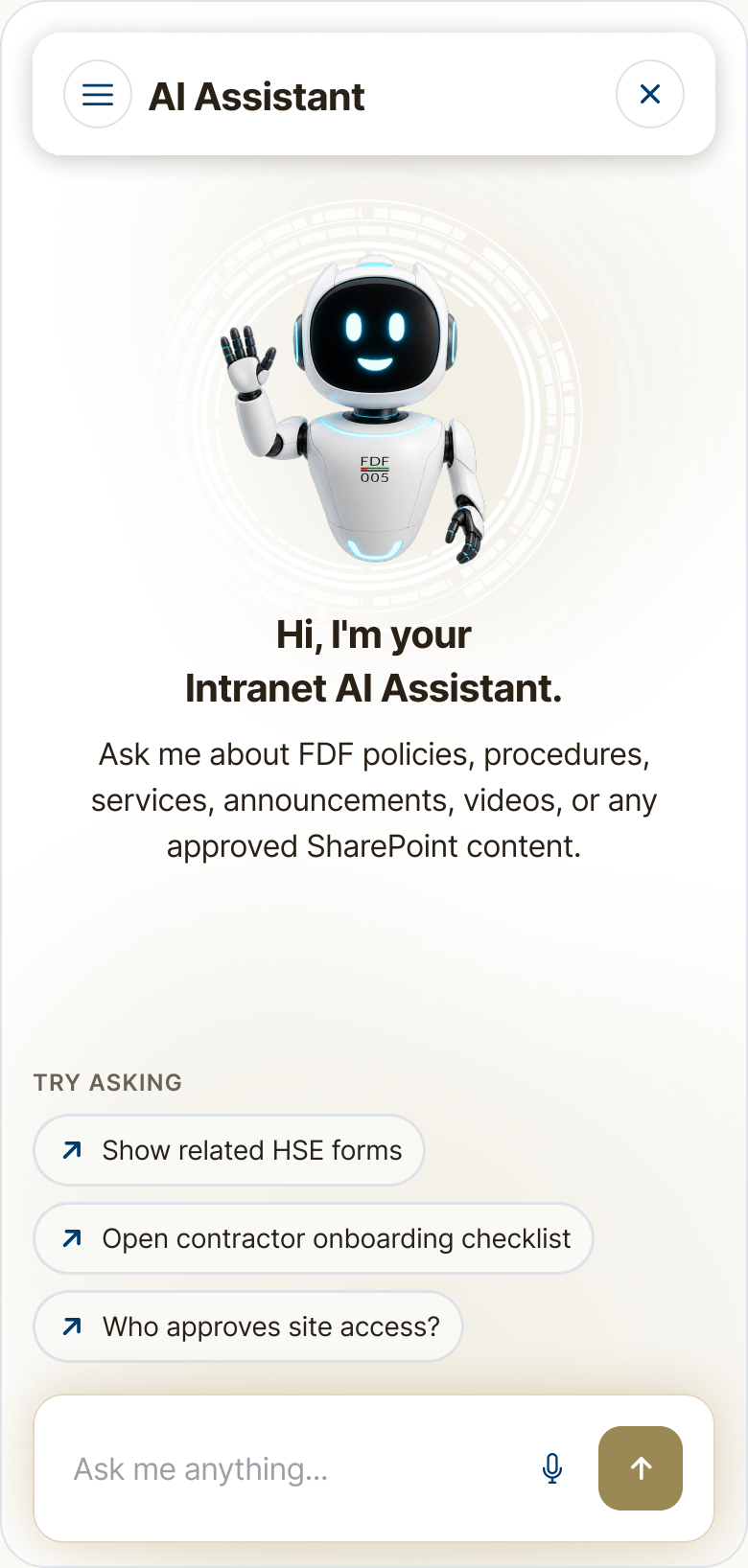
Observed decision: A welcome message, example queries and a bottom question input provide an entry point.
Intended benefit: Make the initial request easier to formulate.
Welcome & suggested queries — English
Table Historical-document discovery verification
| Date Type | Meaning | Verification Need |
|---|---|---|
| Created | When the file was first authored. | Not necessarily when the policy took official effect. |
| Modified | When the file was last edited. | May reflect a minor typographical fix, not a policy shift. |
| Uploaded | When added to the intranet portal. | An archive document may have been uploaded recently. |
| Effective | When the policy actively applies. | Verify through document headers, version tables, and metadata. |
A reusable system, with an honest accessibility review.
Original source documentation and source-defined component specimens from board G. Recommendations are separated from source observations; this is not a complete WCAG audit.
Color styles · Original documentation
Typography · Original documentation
--color-primary
#B3A16A
--color-primary-dark
#9A8955
--color-text-primary
#2B2116
--color-text-secondary
#6B6357
--color-surface-warm
#F5F1E4
--color-navy
#003C71
--color-border-medium
#E0E2E4
--color-border-gold
#E1D9BF
02 Component Specimens & States
Buttons, chips & inputs
Sources component
Switches & feedback
Audit Scoped Contrast Findings
| Solid Color Pair | Reported Ratio | Recommendation |
|---|---|---|
| Primary Gold / White | 2.55:1 | Avoid white normal-size text on gold controls. |
| Gold Dark / White | 3.45:1 | Use dark text or increase weight above 18pt for AA compliance. |
| Dark Navy / White | 11.14:1 | Exemplary contrast across headline & button pairings. |
| Text Primary / Warm Surface | 11.8:1 | Comfortable readability across long body paragraphs. |
| Muted Text / Warm Surface | 4.03:1 | Review fine caption text sizes on warm card surfaces. |
Design evidence is complete. Product outcomes are still open.
The project is in implementation. This case study documents supplied design work, not deployment, adoption, AI accuracy, or measured productivity gains.
Verified design evidence
Original sketch sheet; six grayscale wireframes; ten English and nine Arabic final UI states; source-derived end-to-end and decision flows; explicitly reconstructed IA; documented colors, typography, components, and interaction states.
Limits of the evidence
Team composition, implementation architecture, model configuration, permission enforcement, retention, evaluation, and operating workflow remain unconfirmed. Usability findings and production telemetry are actively tracked.
Framework Proposed Measurement Framework
| Measurement Framework | What to Observe | Status |
|---|---|---|
| Time to retrieve | Query to correct document retrieval | Baseline needed |
| First-query success | Correct result from the initial question | Baseline needed |
| No-result rate | Queries without eligible relevant results | Baseline needed |
| Preview-to-download | Downloads following document previews | Baseline needed |
| Weekly active employees | Unique employees using the assistant each week | Baseline needed |
| Answer helpfulness | Useful responses assessed through feedback ratings | Baseline needed |
| Source coverage | Answers with valid supporting evidence citations | Baseline needed |
| Arabic vs English parity | Comparable task completion by language interface | Baseline needed |